
In This Article
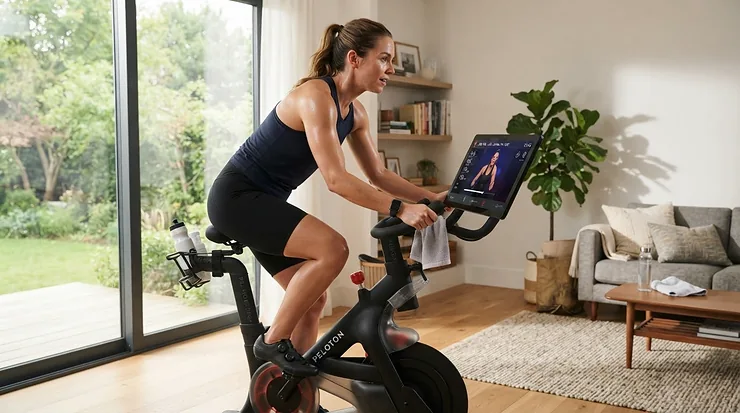
Somewhere between “I really should exercise more” and actually doing it sits a small, stubborn obstacle: boredom. An interactive exercise bike is a stationary cycling machine that pairs onboard or app-based software with live metrics, streamed classes, or gamified routes, turning a repetitive pedal session into something closer to entertainment. That’s the working definition, and it’s also the entire reason this category has exploded across British living rooms, garages, and spare bedrooms over the past few years. Rain outside, dark by 4pm, gym membership gathering dust — the appeal writes itself.

What’s changed lately isn’t the basic concept of a stationary bike (those have been around for over a century), it’s the software wrapped around it. A smart cycling bike with apps now competes directly with a Saturday morning spin class, minus the drive, the parking, and the slightly judgmental instructor. But not every bike marketed as “smart” or “connected” earns that label honestly, and the price gap between a genuinely capable machine and an overpriced tablet holder on wheels is enormous. This guide breaks down seven real, currently available models — budget, mid-range, and premium — with honest analysis of what their apps, screens, and specs actually mean for your living room and your wallet. Regular cycling is repeatedly flagged by heart health charities as one of the more joint-friendly ways to hit weekly activity targets, and an interactive exercise bike is simply a way of making that easier to stick with when the weather, or your motivation, doesn’t cooperate.
Quick Comparison Table
| Bike | Type | Screen/App | Flywheel | Best For |
|---|---|---|---|---|
| Peloton Bike+ | Premium smart bike | 23.8″ rotating touchscreen | Auto-resistance | Class-driven riders |
| NordicTrack Commercial S15i | Premium studio cycle | 14″ HD touchscreen, iFit | 32lb weighted | Incline/decline realism |
| Echelon EX5s | Upper-mid smart bike | 22″ touchscreen, Echelon Fit | Belt-driven | Peloton alternative seekers |
| JLL IC400 Pro | Mid-range app-compatible | LCD + iConsole/Kinomap | 22kg | Tech-curious budgeters |
| JLL IC300 Pro | Budget-mid | Basic LCD, phone holder | 20kg | First-time buyers |
| Bluefin Fitness Tour SP | Budget connected | LCD + Kinomap app | 25kg | Casual home cyclists |
| YOSUDA Indoor Cycling Bike | Entry-level | Basic LCD, tablet mount | 35lb | Tightest budgets |
Looking at the spread above, the gap isn’t really about whether a bike “has an app” — nearly all seven claim some form of connectivity — it’s about whether the resistance adjusts itself, whether the screen is built in or a device you supply, and whether the flywheel weight matches the price tag. The Peloton Bike+ and NordicTrack Commercial S15i justify their higher cost with automated resistance control that reacts to instructors or terrain, while the JLL IC300 Pro and YOSUDA Indoor Cycling Bike rely on you bringing your own tablet and doing the resistance dial yourself. Neither approach is wrong, but they suit very different budgets and expectations.
💬 Found a bike that fits your budget already? Bookmark this page and compare before you commit — your future self will thank you.
Top 7 Interactive Exercise Bikes: Expert Analysis
1. Peloton Bike+ — the connected-fitness benchmark
The Peloton Bike+ built its reputation on the 23.8-inch rotating HD touchscreen, and that swivel function genuinely changes how the bike gets used, since it lets you pivot the screen for floor-based strength or stretching sessions without dismounting. Specs-wise, you’re looking at auto-resistance that adjusts in real time to match instructor callouts, Apple GymKit integration, and a frame built for structured, class-led training rather than free-form pedalling.
Based on the spec comparison with rivals in this list, what most buyers overlook is that the hardware is only half the purchase — the All-Access Membership subscription is where the actual training content, leaderboards, and live classes live, and the bike is comparatively limited without it. Reviewers and independent testers consistently note that the instructor quality and class variety remain the standout feature of the whole ecosystem, though several also flag the ongoing membership cost as the sticking point once the initial excitement fades.
According to consumer-rights testing group Which?, the hardware itself sits at a genuinely premium price point before any subscription is even added, which is worth weighing before you commit.
Pros:
- ✅ Auto-resistance syncs directly to live and on-demand classes
- ✅ Rotating touchscreen doubles for off-bike strength workouts
- ✅ Large, well-established class library with strong instructor reputation
Cons:
- ❌ Mandatory monthly membership adds significant long-term cost
- ❌ Closed ecosystem — limited third-party app compatibility
In the mid-£2,000s range at the time of research, this is a considered investment rather than an impulse buy, and the value verdict really hinges on whether you’ll use the membership consistently enough to justify it.
2. NordicTrack Commercial S15i — incline-decline realism at home
The standout here is the automated 20% incline and -10% decline, a feature none of the other six bikes in this list offer, and it fundamentally changes what a “hill climb” workout feels like indoors. The 14-inch HD touchscreen rotates a full 360 degrees and pairs with the iFit platform, which uses real trainer-led footage filmed on actual outdoor routes to automatically adjust your incline and resistance as you ride.
What the spec sheet won’t tell you, but user reports suggest, is that the 32lb flywheel and SMR silent magnetic resistance combine to make this one of the quietest bikes in its class, a genuinely useful trait for flat-dwellers or early-morning riders. This is a bike aimed squarely at people who miss the feel of an actual outdoor climb and want their console to do the thinking, rather than riders who just want a simple cardio blast.
Aggregated customer feedback frequently highlights the incline/decline motor and screen quality as highlights, while a recurring complaint centres on the ongoing iFit subscription cost eclipsing the value of the free trial period once it ends.
Pros:
- ✅ Genuine incline and decline simulation, not just resistance changes
- ✅ Large rotating touchscreen with strong build quality
- ✅ Quiet SMR magnetic resistance suits shared or flatted living
Cons:
- ❌ Console is largely locked to the iFit subscription ecosystem
- ❌ Bulkier footprint than most bikes on this list
Typically listed in the £1,400-£1,700 range, the S15i earns its price through the incline motor alone — if that feature doesn’t excite you, a flatter, cheaper bike will serve you just as well.
3. Echelon EX5s — the value-driven Peloton rival
The 22-inch HD touchscreen on the Echelon EX5s was clearly designed to go toe-to-toe with Peloton’s display, and on paper this means you get a similarly immersive class experience without committing to Peloton’s specific hardware ecosystem. Key specs worth noting: the screen tilts (though doesn’t rotate side to side), the seat uses a contoured, vented design that reviewers repeatedly call more comfortable than the industry norm, and the console links to the Echelon Fit app across iOS and Android.
Here’s what to weigh — Echelon Fit’s class library, while expanding weekly, still lags slightly behind Peloton’s in testing by independent reviewers, so if content depth is your priority over price, that trade-off matters. Aggregated Amazon review data shows the EX5s scoring strongly overall, with a large majority of buyers rating it five stars, while a consistent minority flag Bluetooth connectivity hiccups and occasional customer-service delays.
For anyone priced out of Peloton but still wanting a proper attached screen rather than a tablet clipped to the handlebars, this fills that gap convincingly.
Pros:
- ✅ Attached HD touchscreen at a lower price than premium rivals
- ✅ Comfortable, vented seat frequently praised in real reviews
- ✅ Four-point adjustability, unusual at this price tier
Cons:
- ❌ Class library still smaller than Peloton’s at time of research
- ❌ Some users report inconsistent Bluetooth pairing
Prices generally sit in the low-£1,000s, positioning the EX5s as the sensible middle ground between a full smart bike and a basic app-compatible cycle.
4. JLL IC400 Pro — studio-grade build, British support
JLL brands this as their “studio grade” model, and the 22kg flywheel backs that claim up — it’s noticeably heavier than most bikes at this price, which translates directly into smoother, more predictable resistance during hard efforts. The console pairs with the free iConsole+ app, and independent testers have also connected it to Kinomap, with some riders bridging it to Zwift and Peloton’s own app using additional adapters, making this a genuinely flexible smart cycling bike with apps rather than a single-ecosystem purchase.
What most buyers overlook about this model is that JLL is a UK-based company with UK-based after-sales support, which matters enormously if a part needs replacing under warranty compared with importing from a US brand.
Reviewers consistently note the smooth belt-driven pedal stroke and sturdy frame as highlights, while a recurring gripe is the small device shelf, which some testers find isn’t grippy enough for larger tablets and can partially obstruct the console view.
Pros:
- ✅ Heavy 22kg flywheel gives smoother, gym-like resistance
- ✅ Works with iConsole+, Kinomap, and (with setup) Zwift or Peloton
- ✅ UK-based brand with accessible warranty support
Cons:
- ❌ Tablet shelf feels flimsy and can block the console
- ❌ Basic LCD console lacks a backlight in low light
Sitting in the £300-£400 range at the time of research, the IC400 Pro is arguably the strongest value pick here if you already own a phone or tablet and don’t need a built-in screen.
5. JLL IC300 Pro — reliable entry point from a UK brand
The JLL IC300 Pro sits one rung below the IC400 on JLL’s range, with a 20kg flywheel that’s still hefty enough to deliver a genuinely challenging pedal stroke rather than the flimsy resistance some entry-level bikes suffer from. The seven-function LCD monitor tracks time, distance, speed, calories, and heart rate via built-in handlebar sensors, and while there’s no dedicated app or Bluetooth here, the sturdy phone/device holder means you can still run a cycling app like Zwift Companion or a YouTube spin class from your own device propped in front of you.
Based on the spec comparison, this is best framed as an “app-enabled workouts” bike rather than a true smart bike — the intelligence comes from whatever you bring to it, not from onboard software.
Reviewers consistently praise the narrow frame that avoids thigh rub during longer rides and the direct belt drive that keeps things quiet, while the most common complaint across aggregated reviews concerns the built-in heart rate sensor, which several users report as inconsistent compared with a dedicated chest strap.
Pros:
- ✅ Solid 20kg flywheel for the price bracket
- ✅ Quiet direct belt drive with minimal maintenance needs
- ✅ Comfortable frame geometry that avoids thigh rubbing
Cons:
- ❌ Built-in heart rate sensor reported as inconsistent
- ❌ No native app or Bluetooth — you supply the device
Typically found around £250-£320, this is a sensible first exercise bike for anyone unsure whether they’ll stick with indoor cycling long-term, without the commitment of a subscription-locked smart bike.

6. Bluefin Fitness Tour SP — budget Kinomap compatibility
Bluefin is a UK-based fitness brand, and the Tour SP’s headline feature is native compatibility with the Kinomap app, which unlocks thousands of real-world scenic route videos, live coaching sessions, and structured workouts for a fraction of what a Peloton-style subscription costs. The 25kg flywheel is genuinely heavy for a bike in this price bracket, paired with a silent belt-drive system and magnetic resistance that adjusts across multiple manual and automated program levels.
Here’s what to weigh: the backlit LCD console and Bluetooth pairing put this comfortably in “connected cycling equipment” territory, but the resistance adjustment itself is still manual rather than auto-syncing to the Kinomap terrain, so don’t expect the incline-matching realism of the pricier NordicTrack.
Aggregated feedback on Bluefin’s range points to strong satisfaction with build quality and the Kinomap integration specifically, with the most frequent criticism being that the console’s backlight and button layout feel a generation behind the touchscreen bikes further up this list.
Pros:
- ✅ Heavy 25kg flywheel unusual at this price point
- ✅ Native Kinomap app support with global route library
- ✅ UK-based brand with straightforward setup
Cons:
- ❌ Resistance is manual, not auto-adjusted to terrain
- ❌ Console feels dated next to touchscreen rivals
Around £180-£280 depending on the exact model variant, the Tour SP represents one of the better value-for-connectivity ratios in this entire list.
7. YOSUDA Indoor Cycling Bike with App — lightest on the wallet
The YOSUDA Indoor Cycling Bike leans on its companion app and a simple tablet holder rather than any built-in screen, and for the price, that’s a completely reasonable trade-off — you’re paying for a sturdy frame and a device mount, not a touchscreen computer. The 35lb flywheel and toe-cage pedals mirror what you’d find on bikes costing considerably more, and the four-way adjustable seat plus two-way handlebars accommodate a wide range of rider heights. What most buyers overlook is that the base model typically lacks Bluetooth, meaning the app functions more as a workout-tracking companion via manual entry than a live-syncing smart trainer, so treat “app-enabled” here loosely rather than expecting Peloton-level integration. Reviewers testing this bike over multiple weeks consistently describe it as a genuinely solid budget performer that holds up better than expected, while the toe-cage strap clasps are a repeated minor gripe, occasionally loosening mid-ride.
Pros:
- ✅ Sturdy build and comfortable four-way adjustable seat
- ✅ Companion app for basic workout tracking and logging
- ✅ Among the most affordable genuinely usable options here
Cons:
- ❌ No Bluetooth on the base model — manual app syncing only
- ❌ Toe-cage straps can loosen during vigorous rides
At roughly £200-£280 depending on configuration, this is the pick for anyone who wants to try indoor cycling with minimal financial risk before upgrading later.
Top 7 Products: Specs and Value Comparison
| Bike | Flywheel | Resistance | Screen Included | Subscription Needed |
|---|---|---|---|---|
| Peloton Bike+ | Auto-adjust | Motorised | Yes, 23.8″ | Yes, for full content |
| NordicTrack Commercial S15i | 32lb | Motorised incline/decline | Yes, 14″ | Yes, for iFit content |
| Echelon EX5s | Belt-driven | Manual dial | Yes, 22″ | Optional, for classes |
| JLL IC400 Pro | 22kg | Manual magnetic | No, device shelf | No |
| JLL IC300 Pro | 20kg | Manual magnetic | No, device holder | No |
| Bluefin Fitness Tour SP | 25kg | Manual magnetic | No, backlit LCD | No |
| YOSUDA Indoor Cycling Bike | 35lb | Manual friction | No, tablet mount | No |
The pattern is clear once it’s laid out like this: the two motorised, auto-resistance bikes (Peloton Bike+ and NordicTrack Commercial S15i) both lock their best features behind a subscription, while the five app-compatible-but-manual bikes let you own the hardware outright and choose whether to pay for content at all. If ongoing costs worry you more than missing out on auto-resistance, the JLL IC400 Pro or Bluefin Fitness Tour SP deliver most of the “connected” experience without a recurring bill.
💬 Take a moment — which row above matches your budget and your patience for a subscription? That’s usually the real deciding factor.

Practical Usage Guide: Getting the Most From Your First 30 Days
Unboxing day enthusiasm is universal; the drop-off that happens around week three is the actual battle. Start with saddle height first — set it level with your hip bone while standing beside the bike, then fine-tune so your knee has a slight bend at the bottom of the pedal stroke, since an over-extended leg is one of the most common causes of early knee discomfort on any interactive exercise bike. Handlebar height should follow, roughly level with or slightly above the saddle for beginners, dropping lower only once your core strength catches up.
For app-enabled workouts, resist the urge to jump straight into an advanced class in week one. Most platforms, whether iFit, Echelon Fit, Kinomap, or a free app paired to a budget bike, offer beginner-tagged sessions specifically calibrated for unfamiliar riders — use them for the first fortnight regardless of your outdoor cycling fitness, because the seated position and cadence patterns differ enough to catch experienced cyclists off guard. Common first-month mistakes include over-tightening toe cages (causing numb toes), skipping the warm-up built into most app programmes, and cranking resistance too high to “feel like a proper workout,” which usually just leads to poor form and early burnout. A quick monthly maintenance habit — wiping down the flywheel area, checking pedal strap tension, and tightening the seat post bolt — keeps most of these bikes running smoothly for years with minimal fuss.
Real-World Scenarios: Matching the Bike to the Rider
Consider three fairly typical UK households. First, a commuter-turned-remote-worker in a one-bedroom flat who wants a proper cardio replacement for the cycle to the office they no longer do — the JLL IC400 Pro suits this well, since its heavier flywheel handles daily use without the footprint or expense of a screen-equipped bike, and a phone propped on the shelf covers podcast or app-based needs.
Second, a family of four sharing one bike across different fitness levels and motivation styles — here the Echelon EX5s or Peloton Bike+ genuinely earns its higher price, because structured, instructor-led classes give less self-motivated household members a reason to actually get on, and the four-point adjustability accommodates very different body sizes.
Third, a budget-conscious student or first flat-share resident testing whether indoor cycling will stick before investing further — the YOSUDA Indoor Cycling Bike or Bluefin Fitness Tour SP make far more sense, since neither demands a subscription commitment and both can be resold relatively easily if cycling doesn’t become a habit.
Problem → Solution: Fixing Common Interactive Exercise Bike Frustrations
Squeaky flywheels are almost always a lubrication or bolt-tension issue rather than a defect — a few drops of silicone-based lubricant on the resistance mechanism (never the belt itself) usually resolves it within a ride or two. Uncomfortable saddles, a near-universal early complaint across every price bracket in this list, are best solved with a gel saddle cover rather than replacing the whole bike, and this single £15-£20 fix resolves more abandoned bikes than any other single change. Device or app connectivity dropouts, particularly on Bluetooth-enabled models like the Echelon EX5s, are frequently fixed simply by keeping your phone or tablet within a metre of the console and closing other Bluetooth-paired apps running in the background. Finally, motivation dips around week four are less a bike problem than a programming problem — switching between structured classes and free rides, or introducing a friend via a shared leaderboard where the platform supports it, consistently outperforms grinding through the same solo routine.
How to Choose an Interactive Exercise Bike
- Decide how much automation you actually want. Auto-adjusting resistance (Peloton, NordicTrack) feels effortless but locks you into that brand’s content; manual resistance costs less and works with any app-enabled workouts you choose.
- Check flywheel weight against your budget tier. Anything above 18-20kg on a manual bike, or the equivalent momentum on a belt-driven model, typically delivers smoother, more realistic resistance.
- Confirm what “app-compatible” actually means for that specific model. Some bikes sync data automatically via Bluetooth; others simply hold a tablet while you run a separate app manually.
- Factor in the subscription, not just the hardware price. A cheaper bike with a £0 monthly cost can work out less expensive over three years than a discounted smart bike with a mandatory membership.
- Match adjustability to your household, not just yourself. If more than one person will ride it, prioritise four-point adjustable seats and handlebars over screen size.
- Consider your flooring and neighbours. Belt-driven and magnetic resistance bikes are consistently quieter in aggregated reviews than older friction-pad designs.
- Read the warranty terms for the display, not just the frame. Screens and consoles fail more often than steel frames, and UK-based brands like JLL and Bluefin tend to offer more straightforward domestic support than importing a claim through a US retailer.
Common Mistakes When Buying an Interactive Exercise Bike
The single most frequent buying mistake is focusing entirely on screen size while ignoring flywheel weight, which has a far bigger day-to-day impact on ride quality than display resolution. A close second is underestimating subscription costs — a bike marketed at a tempting headline price can end up markedly more expensive over two years once a mandatory membership is factored in, something worth calculating honestly before purchase. Buyers also commonly skip checking maximum user weight and inseam range, both of which vary meaningfully between models and can make an otherwise excellent bike genuinely uncomfortable for taller or shorter riders. Finally, plenty of shoppers assume “Bluetooth compatible” automatically means “works seamlessly with Zwift or Peloton’s app,” when in reality several budget bikes require third-party bridging apps or don’t support those platforms at all — always verify compatibility with your specific target app before buying, not after.

Interactive Exercise Bikes vs Traditional Exercise Bikes
A traditional exercise bike — the kind with a basic LCD display showing only time, speed, and calories — hasn’t disappeared, and for pure, no-frills cardio it still does the job perfectly well. What separates it from the digital fitness bikes covered in this guide is entertainment and structure: traditional bikes leave motivation entirely up to you, while connected models provide instructor pacing, route gamification, or at minimum a screen to distract from the repetition. Independent testing groups covering indoor cycling equipment have noted that the connectivity gap between “basic” and “smart” bikes has narrowed in recent years, with even budget models now offering some app pairing that would have been premium-only five years ago.
| Factor | Traditional Exercise Bike | Interactive Exercise Bike |
|---|---|---|
| Motivation structure | Self-directed | Instructor-led or gamified |
| Typical price | Lower upfront | Often higher, sometimes with subscription |
| Long-term engagement | Relies on personal discipline | Higher reported adherence in aggregated reviews |
| Best For | Simple, no-fuss cardio | Riders who need external motivation |
The analysis above suggests the “right” choice depends less on fitness level and more on personality — self-motivated riders who just want quiet cardio may find a traditional bike perfectly sufficient and considerably cheaper, while anyone who has previously abandoned home workout equipment due to boredom will likely get far more consistent use from a connected model, even accounting for the added cost.
Smart Cycling Bikes with Apps for Different Riders
Beginners genuinely benefit most from app-guided pacing, since a good app tells you exactly when to push and when to recover rather than leaving that judgement call to guesswork on day one. More experienced cyclists tend to get the most value from bikes offering structured power-zone or FTP-based training, where a smart cycling bike with apps can translate real fitness metrics into a home equivalent of outdoor training plans. Older riders or those managing joint concerns often do best with models offering the gentlest possible resistance curve and simple, large-text displays — several of the JLL and Bluefin models reviewed here fit that brief well, without the complexity of a full touchscreen interface. Families juggling mixed fitness levels, meanwhile, are usually better served by whichever bike offers the broadest class variety, since a shared machine needs to keep several very different people motivated over the long run.
Features That Actually Matter (And Those That Don’t)
Flywheel weight matters enormously; screen resolution, comparatively, matters very little once you’re a few weeks past unboxing day. A backlit console genuinely helps in a dim spare room, while claimed “resistance level” counts (32 levels versus 24, for instance) matter far less than whether those levels feel meaningfully different from one another when you turn the dial. Bluetooth heart rate strap compatibility is a feature actually worth paying for if accurate training zones matter to you, since built-in handlebar sensors are consistently the least reliable metric across aggregated reviews in this category. Conversely, marketing terms like “commercial grade” or “studio grade” are worth treating with healthy scepticism — they’re not regulated terms, so always cross-reference the actual flywheel weight and frame material rather than taking the label at face value.
Long-Term Cost and Maintenance
The upfront price tag tells only part of the story with any connected cycling equipment. A premium smart bike with a mandatory monthly membership can, over a three-year ownership period, cost considerably more in total than its sticker price suggests, while a manual bike with a one-off free app costs essentially nothing beyond the initial purchase and the very occasional replacement part.
| Bike Type | Approx. Hardware Cost | Ongoing Subscription | 3-Year Estimated Total |
|---|---|---|---|
| Peloton Bike+ | £2,000s range | Required for full content | Highest of the seven |
| NordicTrack Commercial S15i | £1,400-£1,700 | Required for iFit content | High |
| Echelon EX5s | Low-£1,000s | Optional | Moderate-high |
| JLL IC400 Pro | £300-£400 | None required | Lowest, plus occasional parts |
Comparing the table above against actual usage patterns, the value calculation really comes down to how many times per week you’ll realistically ride. Frequent riders who thrive on structured classes tend to justify the subscription cost through sheer volume of use, whereas occasional riders are almost always better served financially by a manual bike, since a barely-used subscription is money spent regardless of hardware quality. Basic maintenance — periodic bolt checks, keeping the flywheel area dust-free, and replacing pedal straps every couple of years — extends the working life of any of these seven bikes well beyond a decade, making the initial hardware spend a genuinely long-term investment either way.
Frequently Asked Questions
❓ What is an interactive exercise bike?
❓ Do interactive exercise bikes need a monthly subscription?
❓ Are cheaper connected exercise bikes actually any good?
❓ What flywheel weight should I look for?
❓ Can I use Zwift or Peloton's app on any smart bike?
Conclusion
There’s no single “best” interactive exercise bike, only the best one for how you’ll actually use it. If structured, instructor-led motivation is what’s kept you consistent in the past, the Peloton Bike+ or NordicTrack Commercial S15i offer genuinely premium experiences that justify their cost for frequent riders. If you’d rather own your hardware outright and skip a recurring bill, the JLL IC400 Pro and Bluefin Fitness Tour SP deliver surprisingly capable connectivity without the ongoing spend, while the JLL IC300 Pro and YOSUDA Indoor Cycling Bike remain sensible, low-risk starting points for anyone still testing the water. The Echelon EX5s sits neatly in between, offering a proper touchscreen experience at a noticeably lower price than the very top tier.
Whichever you choose, the research is consistent on one point: an exercise bike with screen or app support only delivers results if it actually gets ridden. Match the bike to your realistic habits, not your aspirational ones, and set it up somewhere you’ll actually walk past and hop on, and any of these seven will earn its keep.
Recommended for You
- Echelon Bike Deals 2026: 7 Best Smart Cycles Worth Buying
- Echelon Bike Subscription Cost: 7 Plans, Ranked Honestly (2026)
- Echelon EX5 Review 2026: Is This Budget Smart Bike a Steal?
Disclaimer: This article contains affiliate links. As an Amazon Associate, I earn from qualifying purchases. If you purchase products through these links, we may earn a small commission at no additional cost to you.
✨ Found this helpful? Share it with your friends! 💬🤗
