
In This Article
Here’s the thing nobody tells you before you click “add to cart” on an indoor bike: the sticker price is only half the story. The other half shows up every single month, quietly, on your credit card statement. That’s the real conversation around echelon bike subscription cost — not just what the bike costs once, but what it costs forever.

Echelon is a fitness bike that requires a paid membership before it counts your first drop of sweat. So what is echelon bike subscription cost, exactly? It’s the recurring fee — anywhere from about $12 to about $40 a month depending on the tier — that unlocks live and on-demand classes, tracks your stats, and puts you on the leaderboard, on top of whatever you already paid for the hardware.
Millions of people bought connected bikes during the home-fitness boom, and a lot of them are still paying subscriptions they’ve half-forgotten about. According to the CDC’s physical activity guidelines, adults need roughly 150 minutes of moderate cardio a week — which is exactly the kind of habit an indoor bike is supposed to make easier, not more expensive to maintain. This guide breaks down every real Echelon plan, seven actual products worth your money (or not), the app experience, and how the whole ecosystem stacks up against gym memberships and rival platforms. No guesswork, no invented reviews — just what’s actually on the table right now.
Quick Comparison Table
| Plan / Bike | Monthly Cost | Best For | Key Limitation |
|---|---|---|---|
| Echelon FitPass | $11.99 | Off-bike cross-training | No cycling classes included |
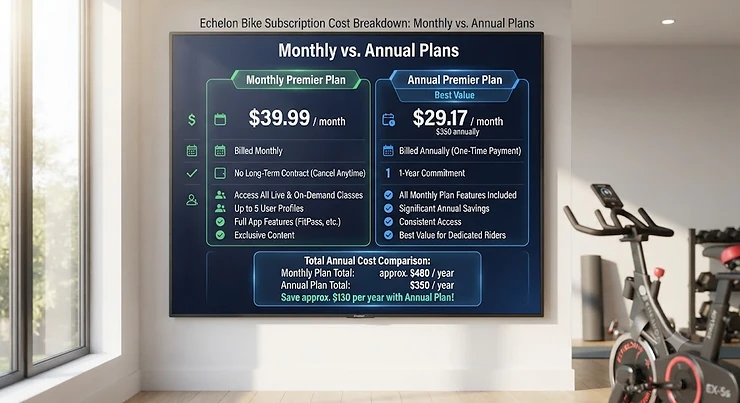
| Echelon Premier (Connect) | $39.99 (or $33.33/mo billed yearly) | Full bike + full app access | Priciest monthly tier |
| Echelon United (2-Year) | ~$29.16/mo (billed $699.99) | Long-term multi-equipment households | Big upfront commitment |
| Echelon Smart Connect EX-3 | Hardware only (~$799 range) | Budget entry point | No touchscreen |
| Echelon Smart Connect EX-8s | Hardware only ($2,299-$2,999 range) | Premium, screen-equipped | Steep total cost of ownership |
A quick scan of this table tells you most of what you need to know before you dig deeper: the cheapest way into the ecosystem is FitPass, but it deliberately locks out the actual bike classes, which is the whole reason most people buy an Echelon in the first place. The Echelon Premier membership is the workhorse plan most bike owners end up on, and stretching to a multi-year Echelon United commitment meaningfully lowers the effective monthly rate if you’re confident you’ll still be riding in 24 months. Hardware price ranges shown here reflect research at the time of writing and can shift with promotions, so always check current pricing before buying.
💬 Found a plan that fits your budget? Compare it against the full lineup below before you commit.
Top 7 Echelon Bikes & Subscription Plans: Expert Analysis
1. Echelon Smart Connect EX-3 — best all-around budget bike
The EX-3 opens the Echelon lineup at under $800, and it earns that price with a surprisingly complete feature set rather than feeling like a stripped-down afterthought. It runs 32 resistance levels through a precision magnetic motor, a 13 kg flywheel, and a competition-style seat with six inches of lever adjustment — specs that mean smoother resistance changes and a sturdier ride than the knob-and-guess systems on cheaper unbranded bikes. In practice, that resistance range covers everything from a gentle recovery spin to a genuinely punishing hill-climb interval, which matters if you’re planning to grow into harder workouts rather than plateauing after month two. Based on the spec comparison across Echelon’s own lineup, the EX-3 is clearly aimed at first-time buyers who want the Echelon ecosystem without committing premium-tier money before they know if they’ll stick with it. Reviewers consistently note that the compact 3’5″ by 1’10” footprint makes it one of the few connected bikes that genuinely works in a small apartment, though the tradeoff is a device holder rather than a built-in screen, so you’ll be propping up your own tablet or phone.
Pros:
- ✅ Compact footprint fits small apartments and shared rooms
- ✅ 32 resistance levels via precise magnetic motor
- ✅ Lowest price of entry into the Echelon ecosystem
Cons:
- ❌ No built-in touchscreen, needs your own tablet
- ❌ Basic handlebars lack the aero adjustability of pricier models
The EX-3 typically sits in the sub-$800 range, and paired with the Echelon Premier membership, it’s the most budget-fitness-membership-friendly way to try the whole ecosystem before scaling up.
2. Echelon Smart Connect EX-5 — best value for a screen-free serious rider
The EX-5 is what Echelon itself calls its most advanced connected bike outside the touchscreen tiers, and the spec sheet backs that up: the same 32-level magnetic resistance and 13 kg flywheel as the EX-3, but wrapped in a steel frame with a four-way adjustable competition seat and a proper Aero handlebar system instead of basic ergonomic bars. What most buyers overlook about this model is that skipping the built-in screen isn’t really a downgrade — it’s a deliberate tradeoff that keeps the hardware price down while letting you use whatever tablet or phone you already own, mounted on a holder that rotates a full 180 degrees for off-bike workouts too. At around 106 pounds, it’s also notably lighter than the touchscreen models, which matters more than people expect when you’re the one dragging it across the room to vacuum. Testers comparing it directly to Echelon’s own pricier bikes have noted the mechanical build quality holds up just as well without the glass on top, which is exactly the kind of honest tradeoff a budget-conscious rider should weigh.
Pros:
- ✅ Four-way adjustable competition seat and handlebars
- ✅ Lighter frame (about 106 lbs) than screen-equipped models
- ✅ SPD-compatible pedals with toe cages included
Cons:
- ❌ No integrated display, so it depends on a separate device
- ❌ Aero handlebar shape isn’t ideal for casual, upright riders
Priced in the $950-$1,050 range depending on promotions, the Echelon Smart Connect EX-5 is the pick for someone who wants studio-grade mechanics without paying for glass they might not need.
3. Echelon Smart Connect EX-5s-22 — best mid-range touchscreen bike
Step up to the EX-5s-22 and you’re paying for one thing specifically: a 22-inch HD swiveling touchscreen that flips a full 180 degrees so it doubles as a floor-workout display. Under the hood it’s mechanically similar to the EX-5 — 32 resistance levels, a comparable flywheel, adjustable seat and handlebars — but the motorized resistance controls add a layer of convenience that matters mid-ride, since the bike can automatically adjust intensity to match a virtual route without you reaching for a knob. Here’s what the spec sheet won’t tell you, but reviewers note: that automatic terrain-matching feature is genuinely the difference between “watching a video while pedaling” and “feeling like the hill is actually there,” and it’s a big part of why people who buy screen models rarely go back to screen-free ones. This bike suits someone who’s already decided cycling is a permanent habit and wants the immersive version rather than the practical one. The jump in price versus the EX-5 buys real functional value, not just a bigger screen for its own sake.
Pros:
- ✅ 22-inch HD swiveling touchscreen doubles as off-bike display
- ✅ Motorized automatic resistance matches virtual terrain
- ✅ Same rugged mechanical base as the EX-5
Cons:
- ❌ Meaningful price jump over screen-free models
- ❌ Heavier and bulkier, harder to reposition solo
Expect a $1,499-$1,799 range for the Echelon Smart Connect EX-5s-22, which lands it squarely as Echelon’s answer to buyers who want an immersive experience without paying flagship prices.
4. Echelon Smart Connect EX-8s — premium flagship pick
At the top of the lineup, the EX-8s is built to be Echelon’s answer to full-priced competitor bikes, and it shows in the details: a 24-inch curved display, a beefier 38-pound flywheel for smoother momentum at high cadence, and a dual-ring LED lighting system that’s more about atmosphere than function but does make late-night rides feel less like a chore. Based on the spec comparison, the bigger flywheel is the detail that actually matters for performance — more rotating mass means less of that jerky, disconnected feeling you get pedaling a lightweight flywheel hard, which is the kind of thing you only notice once you’ve ridden both. At roughly 157 pounds, it’s also the heaviest bike in the family, so plan on picking a permanent spot rather than moving it around your living room. What most buyers overlook here is that the EX-8s is the one Echelon model genuinely built to go toe-to-toe with premium competitor hardware on physical build quality, not just software polish.
Pros:
- ✅ 24-inch curved touchscreen with immersive display
- ✅ 38 lb flywheel delivers smoother, heavier-feeling momentum
- ✅ Sturdiest frame in the Echelon lineup
Cons:
- ❌ Heaviest model (about 157 lbs), hard to reposition
- ❌ Premium price puts it near full-priced competitor bikes
At a $2,299-$2,999 range depending on bundle and promotion, the Echelon Smart Connect EX-8s only makes financial sense if you’re genuinely comparing it to competitor flagships, not to Echelon’s own cheaper models.
5. Echelon FitPass Membership — cheapest way into the app
FitPass is the odd one out on this list because it isn’t tied to a bike at all — it’s a standalone subscription starting at $11.99 per month that unlocks over 25 off-equipment classes: yoga, strength, Pilates, meditation, HIIT, and more. Here’s the catch that trips people up constantly: FitPass explicitly does not include cycling, rowing, or any equipment-based classes, so if your whole reason for reading this article is “what does it cost to ride my Echelon bike,” this plan alone won’t get you there. What most buyers overlook is that FitPass is genuinely useful as a bolt-on for existing Premier subscribers who want variety on rest days, or as a standalone budget fitness membership for someone with no equipment at all who just wants bodyweight and mat-based classes streamed to a TV or phone. Aggregated app-store sentiment suggests the class variety here is a real strength of the platform, even among reviewers who are otherwise critical of Echelon’s core cycling app experience.
Pros:
- ✅ Lowest published price point in the entire Echelon ecosystem
- ✅ Works with zero Echelon equipment required
- ✅ Broad class variety across yoga, HIIT, and strength
Cons:
- ❌ Does not include any bike, row, or equipment classes
- ❌ Easy to accidentally buy thinking it covers cycling
At $11.99 a month, FitPass is the cheapest number attached to the Echelon brand, but it answers a different question than the one most bike shoppers are actually asking.
6. Echelon Premier (Connect) Membership — best value for active bike owners
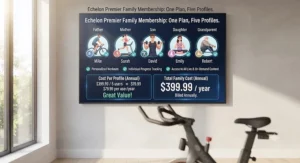
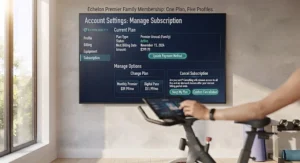
This is the plan most Echelon bike owners actually need, and it’s the core answer to echelon membership price questions for anyone who owns the hardware. Billed monthly it runs $39.99, but paying annually at $399.99 drops the effective rate to about $33.33 a month, and free shipping worth roughly $100 is bundled into the yearly plan as a soft discount you’d otherwise miss on month-to-month billing. Reviewers consistently report that going month-to-month makes sense only during a trial period, since the annual commitment pays for itself within about five months of the price difference. What most buyers overlook about this tier is that it’s the only one that unlocks unlimited live and on-demand classes across cycling, rowing, and strength simultaneously, which matters a lot for mixed-equipment households. Based on the spec comparison against FitPass, the roughly $28-a-month premium buys the entire equipment-based class library, not just an incremental feature bump.
Pros:
- ✅ Unlocks unlimited live and on-demand classes across equipment
- ✅ Annual billing drops effective cost to about $33.33/month
- ✅ Includes free shipping perk worth about $100 on annual plans
Cons:
- ❌ Monthly billing at $39.99 is the priciest entry point
- ❌ Cost stacks on top of the bike’s own purchase price
For anyone actually riding regularly, Echelon Premier is the membership tier that matches the marketing promise of the bike itself.
7. Echelon United (2-Year) Membership — best long-term value plan
Echelon United is the brand’s name for its unified, all-equipment membership tier, and the two-year commitment is where the math gets genuinely compelling: $699.99 billed upfront works out to roughly $29.16 a month, a real discount over both the monthly and single-year Premier rates. This is squarely an echelon united subscription play for households that already know cycling, rowing, or strength training is a permanent fixture, not an experiment. Here’s what the spec sheet won’t tell you, but the math does: locking in for two years only pays off if you’re confident about long-term use, because Echelon’s cancellation terms and any applicable state auto-renewal rules mean you’re committing real money upfront rather than testing the waters. The Federal Trade Commission has been increasingly active on subscription transparency — its Negative Option Rule page tracks ongoing efforts to make cancellation terms clearer across industries, cycling and fitness subscriptions included — so reading the fine print before a multi-year buy-in is worth the ten minutes it takes.
Pros:
- ✅ Lowest effective monthly rate of any Echelon membership tier
- ✅ Covers all equipment types under one all-access plan
- ✅ Locks in pricing against future rate increases for two years
Cons:
- ❌ Large upfront payment with limited flexibility to change course
- ❌ Only makes sense if you’re certain about long-term commitment
If you’re all-in on Echelon as your home gym’s backbone, the Echelon United two-year plan is the most cost-efficient membership on this entire list.
Practical Usage Guide: Setting Up Your Subscription Right
Getting the most out of your echelon bike subscription cost starts before your first ride, not during it. Download the Echelon Fit app first and register your bike over Bluetooth — most setup friction happens here, so make sure your tablet or phone is running the latest OS update before you start, since older software versions are the most common cause of pairing failures reported by users. Take advantage of the 30-day free trial fully: log at least three or four rides a week during that window so you get an honest read on whether the class library and instructor style actually fit your taste, rather than judging the whole platform off one workout. A common mistake in the first 30 days is signing up for the annual or two-year plan immediately out of momentum — resist that until you’ve confirmed the app doesn’t crash mid-class on your specific device, since connectivity issues are one of the most frequently reported complaints. Once you’re settled in, set a maintenance reminder every 90 days to check pedal tightness, wipe down the flywheel area, and confirm your Bluetooth heart-rate monitor still pairs cleanly, since minor mechanical drift is normal on any spin bike under regular use. Finally, explore the filter options inside the app early — filtering by instructor, class length, and workout style is the fastest way to build a rotation you’ll actually stick with instead of defaulting to whatever the home screen shows you.
Real-World Scenarios: Who Actually Needs Which Plan
Picture three different households working through this same decision. First, there’s the budget-conscious grad student in a studio apartment, riding three times a week between classes — for her, the Echelon Smart Connect EX-3 paired with a monthly Premier trial makes sense, because the compact footprint fits her space and she can cancel easily if her schedule changes next semester. Second, there’s a suburban family of four sharing one bike across rowing, cycling, and strength days — for them, the Echelon United two-year membership is the clear financial winner, since multiple household members spreading equipment-based classes across one all-access plan makes the per-person cost trivial. Third, there’s a frequent business traveler who wants workouts on the road more than at home — FitPass alone, without any bike purchase at all, covers her needs for affordable class streaming on a hotel-room floor, and she can add Premier later if she eventually buys equipment. Matching the plan to the actual usage pattern, not the marketing tier that sounds most impressive, is the single biggest lever for keeping your total cost reasonable.
Problem → Solution: Fixing the Most Common Subscription Headaches
A handful of complaints show up again and again across app reviews and forums, and most have a workable fix. Problem one: the app loses Bluetooth connection mid-ride — the most reliable fix reported by users is closing all other Bluetooth-paired apps first and keeping your device within about three feet of the bike’s console. Problem two: ride stats don’t save after a class — this almost always traces back to an inactive or lapsed membership, since the free “Freestyle Ride” mode intentionally doesn’t log data, so confirm your subscription status before assuming it’s a bug. Problem three: buyers accidentally pay for FitPass thinking it includes bike classes — the solution is simply double-checking the plan name against the comparison table above before checking out, since FitPass and Premier serve genuinely different purposes. Problem four: people forget to cancel a trial before it converts to a paid annual plan — set a calendar reminder for day 27 of any 30-day trial, since that buffer gives you time to decide without the pressure of a same-day deadline. Problem five: monthly costs feel unpredictable over a year — solve this by committing to annual or multi-year billing only after at least two months of consistent monthly use, once the habit itself is proven.
How to Choose the Right Echelon Bike Subscription
Picking the right tier comes down to answering a few honest questions about your own habits rather than chasing the plan with the most features. First, be honest about frequency — if you’re riding fewer than twice a week, a monthly plan you can cancel is smarter than an annual commitment, regardless of the per-month savings on paper. Second, check what equipment you actually own or plan to buy, since FitPass and Premier serve fundamentally different use cases and paying for the wrong one wastes money every single month. Third, factor in household size, because a shared login on a family plan spreads the effective cost per rider dramatically lower than a single-person calculation suggests. Fourth, consider your tolerance for upfront risk, since multi-year plans like Echelon United offer the best rate but the least flexibility if your circumstances change. Fifth, read current cancellation terms directly on Echelon’s site before buying anything longer than a month, since subscription policies are exactly the kind of terms regulators like the FTC have flagged as needing clearer disclosure. Sixth, factor in whether you value screen convenience enough to pay the jump from screen-free to touchscreen hardware, since that decision affects your total cost far more than the membership tier itself. Seventh, and most practically, start with the shortest trial period available and only lock in longer billing once you’ve proven the habit to yourself.
Echelon Membership Price Breakdown: United vs FitPass vs Premier
Comparing echelon membership price options side by side clears up a lot of confusion that Echelon’s own marketing pages don’t always make obvious. FitPass at $11.99 a month is the cheapest number in the ecosystem, but it’s built for off-equipment content only. Premier at $39.99 monthly (or $33.33 effectively on the annual plan) is the tier that actually unlocks bike, row, and strength classes together, making it the real “subscription cost” most bike buyers are budgeting for. Echelon United, billed as a two-year commitment at $699.99, brings the effective monthly rate down to about $29.16, undercutting even the annual Premier plan for anyone confident in long-term use. The pattern across all three is consistent: price drops as commitment length increases, and the FitPass tier is priced separately because it’s solving a different problem than equipment-based fitness altogether. Anyone comparing these three needs to match the plan to actual equipment ownership first, then optimize for billing length second — doing it in the reverse order is how people end up locked into a two-year plan for content they can’t actually use.
✨ Ready to pick your plan? Compare the full breakdown above against your own riding habits before you commit to annual billing.
Echelon App Review: Is the Software Worth the Subscription?
Any honest echelon app review has to start with the split personality of its App Store and Play Store ratings — the software has drawn real, verifiable criticism for Bluetooth connectivity drops, occasional freezing mid-class, and stats that fail to save when a membership has lapsed. Aggregated review sentiment across the Apple App Store and Google Play consistently surfaces two camps: users who report reliable syncing and genuinely enjoy the leaderboard and friend-filtering features, and users who report recurring crashes serious enough to abandon a ride mid-session. What most buyers overlook is that a meaningful share of negative reviews trace back to the free “Freestyle Ride” mode, which was never designed to save data, rather than a flaw in the paid experience itself — though paid subscribers have reported their own share of glitches too. On the positive side, reviewers repeatedly praise the breadth of the on-demand library and the ability to filter workouts by instructor and class length, a feature some testers note isn’t matched by rival platforms. The honest takeaway: the software is functional enough to deliver on its core promise, but it isn’t polished to the level its top-tier hardware pricing might suggest, and buyers should treat “the app might glitch occasionally” as a real possibility rather than an edge case.
Echelon vs Peloton vs Budget Streaming Apps
Stacked against Peloton, Echelon generally wins on hardware price and loses on software polish — testers who’ve used both platforms have noted the Peloton app’s production quality still feels a step ahead, even when Echelon’s monthly membership costs less. Against generic budget fitness membership apps that don’t require any bike at all, Echelon only makes sense if you specifically want equipment-based resistance training with a connected leaderboard experience; if you just want streamed workouts, a no-equipment app or Echelon’s own FitPass tier will almost always beat the cost of owning and maintaining a bike. The honest analysis here is that Echelon occupies a middle lane: cheaper than Peloton’s hardware and membership combined, but pricier and more equipment-dependent than pure streaming services built for people with zero gear. Buyers chasing the absolute lowest possible monthly number should look hard at whether they need the bike at all, versus buyers who specifically want resistance-based cardio with progress tracking, for whom Echelon remains a reasonable middle-market choice.
| Platform | Typical Monthly Range | Equipment Required | Best For |
|---|---|---|---|
| Echelon Premier | $33-$40 | Yes (bike, row, or strength gear) | Equipment-based home cycling |
| Peloton App/Bike | Comparable or higher combined cost | Optional for app-only tier | Premium software polish |
| Generic streaming fitness apps | Often under $20 | None | Pure affordable class streaming, no hardware |
Looking at this comparison, Echelon Premier sits in a reasonable middle position on price, but the real decision driver isn’t the membership fee at all — it’s whether you actually want a bike in your living room or just want streamed classes on a screen you already own. Buyers optimizing purely for the lowest number every month should seriously weigh whether Echelon’s equipment requirement is buying them anything a no-equipment app doesn’t already offer.
Long-Term Cost & Maintenance: The Real Total Cost of Ownership
The subscription fee is never the full financial picture, and pretending otherwise is how people end up surprised a year in. Add up hardware cost, the ongoing membership, occasional accessory purchases like cycling shoes or a heart-rate strap, and the eventual cost of pedals or a seat replacement after a couple of years of regular use, and the true annual cost of owning an Echelon bike runs meaningfully higher than the subscription line alone suggests. On the Echelon Smart Connect EX-3, for instance, a first-year total combining hardware and an annual Premier plan lands well under what a comparable premium competitor bike costs in year one alone, which is the strongest financial argument in Echelon’s favor. Past year one, though, the math flattens out, because the subscription becomes the dominant recurring cost regardless of which bike you originally bought — meaning the membership tier you choose matters more to your five-year total than which bike model you picked. Cost-per-ride is the most useful lens here: someone riding four times a week on a Premier plan is paying just a few dollars per session, while someone riding once a month is effectively paying a steep per-ride premium for the convenience of having equipment at home.
Common Mistakes When Buying an Echelon Subscription
The single most common mistake is buying the bike and assuming a subscription is optional — it isn’t, for anyone who wants classes, stats, or leaderboard access, and skipping this fact leads to buyer’s remorse within the first week. A close second is defaulting to the priciest annual plan out of a “just get the best one” instinct without confirming actual ride frequency first, which routinely leaves people paying for classes they attend twice a month. Another frequent error is confusing FitPass with Premier, since the names sound similar but the class libraries barely overlap. Buyers also commonly underestimate shipping and setup logistics, forgetting that these bikes weigh well over 100 pounds and aren’t a simple one-person unboxing job. Finally, a lot of people skip reading cancellation terms entirely, which becomes a real problem the moment life circumstances change and a multi-year plan suddenly feels like dead weight rather than a smart discount.
Subscription Cancellation & Compliance Guide
Cancellation policy is worth understanding before you buy, not after you’ve decided to quit. Echelon’s terms allow cancellation of monthly plans without a lengthy commitment, but annual and multi-year plans are prepaid commitments, meaning you generally won’t get a prorated refund simply for changing your mind partway through. This is exactly the territory regulators have been scrutinizing recently — negative-option billing, where a subscription automatically renews unless you actively cancel, has drawn sustained federal attention, and the American Heart Association itself notes that sustainable long-term activity habits matter more than any single piece of equipment, which is a useful reminder not to over-commit financially before a habit is proven. Practically speaking, always cancel through the official app or account portal rather than assuming a support email will process a cancellation on your behalf, and screenshot your cancellation confirmation for your own records. If you’re on a promotional trial, mark the exact conversion date somewhere visible, since Echelon’s default is to convert automatically into a paid plan unless you act first.
Frequently Asked Questions
❓ How much does an echelon bike subscription cost per month?
❓ Can you use an Echelon bike without a subscription?
❓ Is Echelon United the same as Echelon Premier?
❓ Does the Echelon app work well, based on real reviews?
❓ Is Echelon cheaper than Peloton overall?
Conclusion
Echelon bike subscription cost isn’t one number — it’s a range that shifts dramatically depending on which bike you buy, which membership tier you pick, and how honestly you assess your own riding habits before committing to annual billing. The EX-3 and EX-5 make sense for budget-conscious first-timers, the EX-5s-22 and EX-8s reward people who’ve already proven cycling is a permanent habit, and the membership decision between FitPass, Premier, and United ultimately comes down to what equipment you own and how long you’re willing to commit. None of the seven options here is universally “best” — the right pick depends entirely on your space, your budget, and whether you’re testing the waters or building a long-term home gym. Read the cancellation terms, start with the shortest trial you can, and let your actual ride frequency — not the marketing tier names — decide which plan earns a permanent spot on your monthly statement.
✨ Want personalized help matching your budget to the right Echelon plan? Drop a comment below and we’ll walk through it with you!
Recommended for You
- Echelon EX5 Review 2026: Is This Budget Smart Bike a Steal?
- Echelon vs Peloton 2026: 7 Best Smart Bikes Compared Honestly
- Best Echelon Bike 2026: 7 Smart Connect Models Reviewed
Disclaimer: This article contains affiliate links. As an Amazon Associate, I earn from qualifying purchases. If you purchase products through these links, we may earn a small commission at no additional cost to you.
✨ Found this helpful? Share it with your friends! 💬🤗
