
In This Article
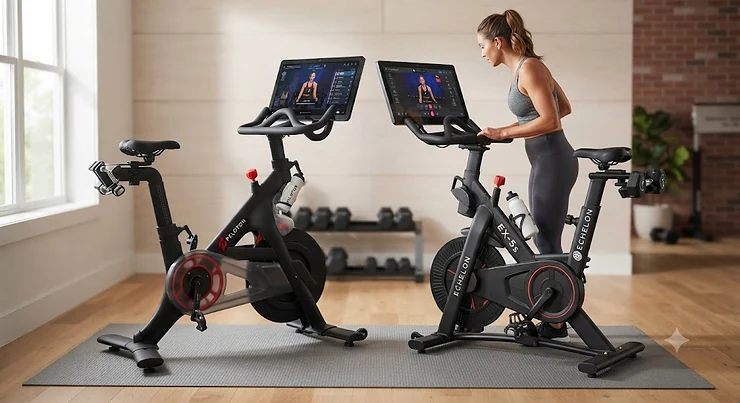
Somewhere between your third scroll through Instagram ads and your neighbor’s unprompted testimonial about “changing her whole life,” you landed here trying to settle the echelon vs peloton question once and for all. Fair enough — this isn’t a cheap decision, and the marketing on both sides is loud enough to drown out the actual differences that matter. One brand built the category and turned spin class into a cultural moment. The other quietly built a lineup with more hardware options and a friendlier price tag, then spent years chipping away at the perception that it’s just “the budget one.”\\
What you actually get with echelon vs peloton comes down to three things: flywheel feel, screen integration, and — the part nobody puts on a billboard — the monthly subscription math that determines what this bike really costs over three years. According to the CDC’s Physical Activity Guidelines for Americans, adults need about 150 minutes of moderate aerobic activity a week, and a smart bike is one of the few tools that makes hitting that number feel less like a chore and more like a habit you’d actually keep. This guide breaks down seven real bikes across both brands — budget, mid-range, and premium — with honest commentary on what the spec sheets don’t tell you.
What Is Echelon vs Peloton?
Echelon vs Peloton refers to the ongoing comparison between two major connected-fitness bike brands: Peloton, the category pioneer known for premium build quality and produced-in-a-studio classes, and Echelon, a value-focused challenger offering a wider hardware lineup at lower price points with a comparable app ecosystem.
Both brands sell hardware and lock the good stuff — live classes, leaderboards, structured programs — behind a monthly membership. That’s the part that trips people up, because the bike is only half the purchase.
Quick Comparison Table
Before diving into all seven bikes, here’s the smart bike comparison at a glance so you can see where each brand’s strengths actually sit.
| Bike | Price Range | Screen | Resistance | Best For |
|---|---|---|---|---|
| Echelon GT+ | Under $900 | BYOD (tablet holder) | 32-level magnetic | Tightest budgets |
| Echelon EX-3 | Around $900-$1,000 | BYOD, rotating holder | 32-level magnetic | Small spaces |
| Echelon EX-5 | $800-$1,000 range | BYOD, rotating holder | 32-level magnetic | Purists who own a tablet |
| Peloton Bike | $1,400-$1,600 new / much less used | 21.5″ fixed HD | Manual knob | Ecosystem newcomers |
| Echelon EX-5s-22 | $1,300-$1,800 range | 22″ built-in HD | 32-level magnetic | Mid-range screen seekers |
| Peloton Bike+ | Mid-$2,000s | 23.8″ rotating HD | Auto-adjusting | Strength + cardio crossover |
| Echelon EX-8s | Low-to-upper $2,000s | 24″ curved HD | 32-level, dual flywheel | Immersive home-studio feel |
Looking at this smart bike comparison, the pattern is obvious once you see it laid out: Echelon wins on hardware variety and entry price, while Peloton wins on brand consistency and the auto-resistance tech found on the Peloton Bike+. Where things get interesting is the middle of the table — the Echelon EX-5s-22 undercuts the Peloton Bike on price while matching it on screen size, which is exactly the kind of detail Amazon listings never spell out for you.
💬 Just one click — help others make better buying decisions too!😊
Top 7 Smart Bikes: Expert Analysis
Here’s the full lineup, ranked from most budget-friendly to full-flagship, with real specs interpreted into what they actually mean for your ride.
1. Echelon GT+ — most wallet-friendly entry point
The Echelon GT+ is Echelon’s way of saying “you don’t need a touchscreen to get a good ride,” and for a lot of first-time buyers, that’s exactly right. At under $900, it undercuts nearly everything else on this list while still delivering the same core riding mechanics as its pricier siblings.
Specs that matter: the 32-level silent magnetic resistance system means you get a genuinely quiet ride — no clunky friction pads grinding away under your kitchen speakers. At 88 pounds, it’s also the lightest bike here, which matters more than people expect when you’re rolling it in and out of a shared living room. There’s no built-in display, just a tablet-and-phone mount, so your own device becomes the screen.
Based on the spec comparison, the GT+ is built for the person who already owns a decent tablet and doesn’t want to pay a “screen tax” for hardware they’re not going to use anyway. It’s not for someone chasing the full immersive studio look. Reviewers consistently note that the resistance dial feels smooth and the frame holds up well for its price class, though a few mention wishing for Bluetooth built into the frame itself rather than routing everything through the companion app.
Pros:
- ✅ Lowest price of entry into the Echelon ecosystem
- ✅ Lightest bike on this list at 88 pounds
- ✅ Quiet 32-level magnetic resistance system
Cons:
- ❌ No built-in display of any kind
- ❌ Bluetooth connectivity can occasionally feel finicky
At under $900, plus the same $34.99/month Echelon Premier fee as the rest of the lineup, the GT+ delivers the best entry-level value on this whole list if you already have a tablet to mount.

2. Echelon EX-3 — best compact budget upgrade
Step up slightly and you land on the Echelon EX-3, which trades a little bit of that rock-bottom pricing for a beefier flywheel and a smaller footprint that fits into genuinely tight apartments.
The 29- to 33-pound rear-mounted flywheel (specs vary slightly by production year) gives noticeably more momentum through your pedal stroke than the GT+’s lighter setup — what most buyers overlook is that flywheel weight is the single biggest factor in how “smooth” a stationary bike feels, more than resistance level count. The device holder rotates 180 degrees for off-bike stretching or strength work, a small touch that starts to close the gap with pricier screen-equipped models.
Here’s what to weigh: the EX-3 is explicitly being phased into the EX-5 series by Echelon’s own lineup planning, so availability can be inconsistent — some retailers list the EX-5-10 as its spiritual successor. Aggregated review sentiment describes setup as manageable solo in under two hours, with the resistance dial requiring a few firm cranks to move between levels, which a subset of riders find slightly clunky mid-workout.
Pros:
- ✅ Heavier flywheel than the GT+ for a smoother pedal stroke
- ✅ Compact footprint fits small apartments easily
- ✅ Rotating device holder doubles for off-bike workouts
Cons:
- ❌ Being phased out, so stock can be inconsistent
- ❌ Resistance dial requires firm, deliberate adjustments
Priced around $900-$1,000, the EX-3 is a smart pick if you can find current stock and want a heavier flywheel feel without jumping to the touchscreen-equipped models.
3. Echelon EX-5 — best flywheel feel without the screen tax
If the EX-3 is being phased out, the Echelon EX-5 is its clear, better-supported replacement — and honestly, it might be the sleeper pick of the entire Echelon lineup.
The headline spec here is that the EX-5 uses the exact same 32-level magnetic resistance and heavy-duty flywheel as the pricier EX-5s-22, just without the built-in screen. What most buyers overlook about this model is that you’re paying almost entirely for glass and bezels when you upgrade to the touchscreen versions — the actual ride quality, resistance feel, and frame are functionally identical across the tier.
For riders who already stream classes on a tablet, a laptop, or even a smart TV across the room, that’s essentially free money left on the table if you buy the pricier sibling instead. The 360-degree rotating device mount keeps your own screen positioned wherever you need it. Aggregated reviews describe it as the “purist’s” choice in the 2026 lineup — riders who care about the mechanical ride over the tech wrapper consistently rate it well, though some note the smaller footprint means less stability when sprinting hard out of the saddle compared to heavier flagship frames.
Pros:
- ✅ Identical 32-level resistance and flywheel to pricier models
- ✅ 360-degree rotating mount for your own device
- ✅ Best value-per-dollar in the entire Echelon lineup
Cons:
- ❌ No built-in touchscreen at all
- ❌ Slightly less stable than heavier flagship frames when sprinting
At roughly $800-$1,000 depending on retailer promotions, the EX-5 is arguably the smartest buy on this entire list if screen size isn’t your top priority.
4. Peloton Bike — most recognizable ecosystem pick
The original Peloton Bike is still the name most people mean when they say “I want a Peloton,” and there’s a reason it built an entire subculture around itself: the instructor talent and production value on Peloton’s app remain genuinely a level above most competitors.
Specs-wise, the 21.5-inch fixed HD touchscreen doesn’t rotate like the Bike+’s does, and resistance is manually controlled via a knob rather than auto-adjusting — meaning during a class, you’re the one turning the dial when the instructor calls out a target number. On paper this means slightly more hands-on engagement during a workout, which some riders genuinely prefer because it keeps you paying attention to pacing cues instead of zoning out.
Here’s what the spec sheet won’t tell you, but user reports suggest: the used market for the original Bike has become a legitimately smart way to enter the ecosystem, with well-maintained units trading for a fraction of retail thanks to strong five-year frame warranties. It’s also worth knowing this specific model was subject to a CPSC-announced recall related to seat post failures — Peloton offers free replacement parts, and it’s worth checking your serial number before buying secondhand.
Pros:
- ✅ Best-in-class instructor talent and class production value
- ✅ Strong five-year frame warranty from Peloton
- ✅ Thriving used market drives down effective entry cost
Cons:
- ❌ Manual resistance knob, no auto-adjust feature
- ❌ Subject to a seat post recall on early units
New units run in the $1,400-$1,600 range depending on current promotions, while used units frequently sell for a few hundred dollars — a genuinely different value equation worth factoring into your echelon vs peloton decision.
5. Echelon EX-5s-22 — best mid-range built-in screen
The Echelon EX-5s-22 takes everything mechanically good about the EX-5 and bolts on a 22-inch HD touchscreen, landing squarely in the price bracket most shoppers comparing echelon vs peloton are actually shopping in.
The flywheel and 32-level silent magnetic resistance are shared with the EX-5, so the ride feel is identical — what you’re paying the premium for is the fully integrated display, which eliminates the wobbly tablet-mount problem entirely. Based on the spec comparison, this is the sweet spot in Echelon’s lineup: enough screen real estate to feel immersive during a scenic ride, without stepping up to the dual-flywheel flagship pricing.
Reviewers testing the 2026 model line describe the resistance knob as tactile and precise, giving “authority over your climb” during hill segments, and note the screen’s rotation makes off-bike strength segments far more usable than earlier Echelon generations. A recurring complaint in user reviews is that Echelon’s instructor bench, while solid, doesn’t yet match Peloton’s depth or production polish.
Pros:
- ✅ Fully integrated 22-inch HD touchscreen
- ✅ Same premium flywheel and resistance as the EX-5
- ✅ Rotating screen supports off-bike workouts
Cons:
- ❌ Instructor roster is smaller than Peloton’s
- ❌ Priced noticeably above Echelon’s BYOD models
Priced in the $1,300-$1,800 range depending on bundle and retailer sales, the EX-5s-22 lands as one of the strongest value picks if screen integration matters to you but the flagship price doesn’t.
6. Peloton Bike+ — best auto-resistance and strength crossover
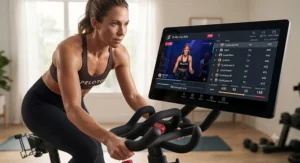
The Peloton Bike+ is where Peloton makes its clearest case for the price premium: automatic resistance adjustment, Apple GymKit integration, and a 23.8-inch screen that rotates a full 180 degrees to face the floor for off-bike strength segments.
That auto-resistance feature genuinely changes the workout experience in a way that’s hard to appreciate until you’ve used it — when an instructor calls out a target number, the bike adjusts itself instead of you fumbling with a knob mid-sprint. Reviewers who’ve spent real time on both the base Bike and the Bike+ consistently describe this as the single upgrade that justifies the price gap, more than the bigger screen alone. The rotating, tilting display is also what makes the Bike+ function as a genuine hybrid cardio-and-strength platform rather than just a bike with a monitor bolted on.
What the spec sheet doesn’t fully convey: this rotation is also the reason the Bike+ can double as your primary home-gym screen for Peloton’s non-cycling content, from yoga to guided strength circuits, without needing a second device anywhere in the room. A common complaint in user reviews centers on the 12-month warranty on components and touchscreen, which several owners feel is short given the price tag.
Pros:
- ✅ Auto-adjusting resistance keeps you locked to instructor cues
- ✅ Full 180-degree rotating, tilting 23.8-inch screen
- ✅ Doubles as a full home-gym display for non-cycling content
Cons:
- ❌ Only a 12-month warranty on parts and touchscreen
- ❌ Roughly $1,000 more than the base Bike at retail
New units sit in the mid-$2,000s, while a healthy used market brings well-maintained Bike+ units down substantially — worth cross-shopping if the auto-resistance feature specifically is your priority.
7. Echelon EX-8s — most immersive flagship dual-flywheel bike
At the top of Echelon’s lineup sits the Echelon EX-8s, a bike that stops pretending to be the “budget option” entirely and instead goes head-to-head with Peloton’s flagship on pure spectacle.
The dual-flywheel design with customizable LED lighting is the headline feature — the rings can sync to your heart rate zones or just pulse along with your music, which sounds gimmicky until you realize it gives you a genuinely useful peripheral cue of your effort level without staring at a data dashboard. What most buyers overlook about this model is the flexing frame, a feature none of its direct competitors — including the Peloton Bike+ — currently offer, which gently absorbs impact during hard out-of-the-saddle efforts to reduce joint strain over long-term use.
The 24-inch curved touchscreen with 180-degree flip rotation and Bluetooth resistance control (adjustable from the handlebars mid-ride) round out a genuinely premium package. Reviewers who’ve tested it against Echelon’s own EX-5s-22 describe the dual-flywheel stability as noticeably smoother during heavy sprints, and note the curved screen creates a more “wraparound” feel during scenic content than any flat-panel competitor at this price.
Pros:
- ✅ Unique dual-flywheel design with biofeedback LED lighting
- ✅ Flexing frame reduces joint impact during hard efforts
- ✅ Bluetooth resistance controller adjustable from handlebars
Cons:
- ❌ Priciest bike in the Echelon lineup by a wide margin
- ❌ LED lighting feature adds cost some riders won’t use
Pricing typically lands in the low-to-upper $2,000s depending on retailer and bundle, putting it in direct competition with the Peloton Bike+ — and depending on how much you value the flexing frame and lighting, it can genuinely win that matchup on paper.
Practical Usage Guide: Setup, First 30 Days & Maintenance
Getting either bike from box to ready-to-ride takes most people 60-120 minutes solo, longer with a helper, and the flywheel-mounted models (EX-5 and above, both Peloton bikes) are heavy enough that a second set of hands genuinely helps during the frame-and-flywheel assembly step. Set aside a clear afternoon rather than squeezing it into a lunch break.
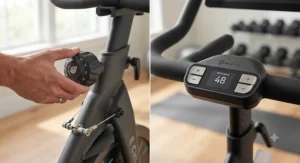
In the first 30 days, the most common mistake is skipping resistance calibration — both brands recommend riding a few easy sessions at low resistance before jumping into instructor-led climbs, since the magnetic braking system needs a short break-in period to feel consistent. The second common mistake is neglecting basic maintenance: wipe down the frame and flywheel area after every sweaty session, since salt residue is the leading cause of premature corrosion on steel-frame bikes. Check pedal and seat post bolts monthly with an Allen key — vibration loosens them faster than most riders expect, and a loose seat post is exactly the failure mode behind Peloton’s recall notice above. Lastly, recalibrate your resistance knob or app pairing roughly every 90 days, since both platforms occasionally drift out of sync after firmware updates.
Real-World Scenarios: Who Should Buy Which Bike
Picture Maya, a grad student in a 500-square-foot apartment who rides four mornings a week before an 8-hour lab shift. She doesn’t need a giant screen — she needs something light enough to tuck against a wall and quiet enough not to wake her roommate. The Echelon GT+ or EX-5 fits that life far better than a 135-pound Peloton frame ever could.
Now picture Daniel, a former college athlete who wants structured strength-plus-cardio programming and doesn’t mind paying for it. He’s the exact profile the Peloton Bike+ was designed around — the auto-resistance and rotating screen turn one machine into his entire home-gym setup, and he’s disciplined enough to actually use the off-bike content.
Finally, picture the Ortiz family, budget-conscious but wanting the most “wow factor” bike in the living room for guests and teenagers alike. The Echelon EX-8s‘s LED flywheel and curved screen deliver spectacle at a price that, while high, still undercuts Peloton’s flagship — a genuinely reasonable trade for a family that wants the experience without the top-tier price tag.
Problem → Solution Guide
Problem: The bike feels wobbly during hard sprints. Solution: check that all four leveling feet are firmly seated on a hard floor, and confirm the flywheel bolts weren’t left loose from assembly — this is more common on lighter frames like the GT+ than on flagship dual-flywheel models.
Problem: Resistance feels inconsistent between sessions. Solution: recalibrate through the app settings menu, since firmware updates occasionally reset your baseline resistance curve on both Echelon and Peloton hardware.
Problem: The subscription feels like it’s not worth it some months. Solution: most platforms allow pausing rather than canceling outright — use this during travel-heavy months instead of losing your ride history and settings.
Problem: Screen glare makes classes hard to see near a window. Solution: reposition the bike or invest in an anti-glare screen protector; the Peloton Bike+‘s anti-reflective coating largely solves this natively, while Echelon riders may need a third-party film.
Problem: You’re outgrowing a BYOD model and want a bigger screen. Solution: within Echelon’s own lineup, upgrading from the EX-5 to the EX-5s-22 preserves the identical flywheel and resistance system, so you’re only paying for the display — a much smaller jump than switching ecosystems entirely.
How to Choose: Echelon or Peloton Better for You?
- Start with your space. Echelon’s lighter frames (88-124 lbs) suit apartments; Peloton’s bikes run heavier and want a dedicated floor spot.
- Decide if auto-resistance matters. Only the Peloton Bike+ offers it — if you hate touching a knob mid-class, that’s a deciding factor on its own.
- Price out three years, not one purchase. Bike price plus roughly three years of membership tells the real story, not the sticker on the box.
- Check the used market first. Peloton’s original Bike has a genuinely strong resale ecosystem that can cut your entry cost by more than half.
- Weigh instructor style over hardware specs. Peloton’s production polish is still a real, measurable difference — try both apps’ free trials before committing to hardware.
- Consider household needs beyond cycling. If off-bike strength content matters, prioritize a rotating screen (Bike+, EX-5s-22, EX-8s) over a fixed one.
- Match warranty length to how long you’ll keep it. Peloton’s five-year frame warranty on the base Bike outclasses most of Echelon’s coverage — factor that into long-term risk.
Common Mistakes When Buying a Smart Bike
The most expensive mistake shoppers make in the echelon vs peloton debate is comparing bike price alone and ignoring the membership, which over three years often costs more than the hardware itself. A close second is assuming “more resistance levels” automatically means a better ride — flywheel weight and build quality affect smoothness far more than whether a bike has 24 or 32 resistance steps. Buyers also frequently skip measuring their space, then discover the bike, floor mat, and clearance for stepping on and off require more square footage than expected. Finally, many people buy based on Instagram ad polish rather than checking a model’s actual warranty terms and recall history — a step that takes five minutes and can save a genuine headache down the line.
Echelon vs Peloton: Feature Differences Breakdown
The feature differences that actually separate these platforms come down to four categories: resistance mechanism, screen behavior, connectivity, and physical footprint. On resistance, Echelon uses a manual knob across its entire lineup while Peloton’s manual knob only appears on the base Bike — the Bike+ automates it entirely. On screens, only three bikes in this comparison feature genuine rotation (Bike+, EX-5s-22, EX-8s), while the rest rely on either fixed panels or bring-your-own-device mounts.
Connectivity-wise, both ecosystems use Bluetooth for heart rate monitors, but the EX-8s uniquely lets you adjust resistance from the handlebars via Bluetooth rather than reaching for a frame-mounted knob. On footprint, Echelon’s lineup runs 15-30 pounds lighter across comparable tiers, a genuinely meaningful difference if you’re moving the bike between rooms regularly rather than leaving it permanently staged.
Subscription Cost Comparison: Monthly Membership Breakdown
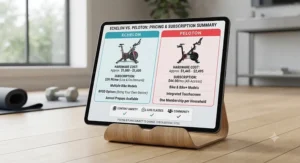
Here’s the subscription cost comparison that rarely makes it into marketing copy: Peloton’s All-Access membership runs at the higher end of the market, while Echelon’s Premier membership typically prices in a few dollars below it monthly. Over a three-year ownership window, that gap compounds into a meaningful dollar figure — often several hundred dollars — that should factor into your total cost of ownership math just as heavily as the bike price itself.
| Membership | Approx. Monthly Cost | 3-Year Estimated Total | Best For |
|---|---|---|---|
| Peloton All-Access | Upper-$30s to low-$40s | Highest of the two | Instructor variety, production quality |
| Echelon Premier | Mid-to-upper $30s | Slightly lower than Peloton | Budget-conscious riders wanting live/on-demand classes |
Looking at the table, the gap between the two memberships is smaller than most people assume — meaning your bike choice, not your app choice, is where the bigger long-term savings actually live. If you’re deciding between the Echelon EX-5 and Peloton Bike, the subscription difference over three years won’t outweigh the roughly few-hundred-dollar hardware gap between them.
✨ Don’t Miss These Exclusive Deals!
🔍 Take your smart bike search to the next level with these carefully selected picks. Click on any highlighted item to check current pricing and availability. These bikes will help you build a home cardio routine your whole household will actually stick with!
Price-Performance Ratio: Which Bike Wins?
If you’re purely optimizing price-performance ratio, the math tilts toward Echelon’s mid-tier lineup. The Echelon EX-5 delivers an identical flywheel and resistance system to the $1,300+ EX-5s-22 for meaningfully less money, which is about as clean a price-performance win as this category offers. On the premium end, the Echelon EX-8s‘s dual-flywheel and flexing frame arguably out-spec the Peloton Bike+ in raw hardware terms for a comparable or lower price, though Peloton’s software polish narrows that gap in practice.
Where Peloton reclaims price-performance ground is the used market — a well-maintained secondhand original Peloton Bike can undercut every Echelon model on this list while still delivering Peloton’s superior instructor programming, provided you’re comfortable buying used equipment and verifying recall status first.
Long-Term Cost & Maintenance
Total cost of ownership over three years looks roughly like this: bike price, plus roughly 36 months of membership fees, plus incidental maintenance (occasional bolt tightening, floor mat, replacement pedals or cleats every couple of years). On both ends of the price spectrum, the membership fee — not the bike — becomes the dominant long-term cost once you’re past year one. That’s precisely why the American Heart Association’s guidance on aerobic activity is worth keeping in mind here: the health payoff scales with consistent use, not with how much hardware you bought, so the cheaper bike you’ll actually ride every week can out-value the flagship gathering dust in a corner.
Maintenance costs stay modest across both brands — steel frames and magnetic resistance systems are inherently low-wear compared to belt-driven or friction-pad designs, and most owners report going years without a hardware failure outside of the documented seat post issue on early Peloton units.
Features That Actually Matter (And Those That Don’t)
Features that matter: flywheel weight, screen rotation (if you do off-bike content), warranty length, and resistance mechanism type. Features that matter far less than marketing suggests: exact resistance level count above roughly 24 steps, cosmetic details like flywheel LED color options, and headline touchscreen size once you’re above 21 inches — most riders can’t meaningfully tell a 22-inch screen from a 24-inch one at typical riding distance.
Safety, Recalls & Regulations Guide
Home fitness equipment isn’t heavily regulated the way medical devices are, but the Cycling Weekly deep-dive comparison into both brands is a useful independent reference point beyond what either company publishes about itself. The most important safety note for this specific comparison: original-model Peloton Bikes are subject to a seat post recall, and Peloton offers a free replacement part to any owner regardless of purchase date. If you’re buying a used original Bike, checking the serial number against the recall before your first ride is a five-minute step worth taking. Beyond that, standard equipment safety practices apply to both brands — inspect bolts periodically, keep the area around the flywheel clear, and follow each manufacturer’s weight capacity guidance.
Frequently Asked Questions
❓ Is Echelon or Peloton better for beginners?
❓ Does Echelon really compare to Peloton in quality?
❓ Which bike has cheaper monthly membership fees?
❓ Can I use a Peloton or Echelon bike without a subscription?
❓ Is the Peloton seat post recall still relevant in 2026?
Conclusion
If there’s one honest takeaway from this echelon vs peloton comparison, it’s that neither brand wins outright — they win for different people. Budget-conscious riders and apartment dwellers get real value out of the Echelon EX-5 or GT+, mid-range shoppers get a genuinely close fight between the Echelon EX-5s-22 and a used Peloton Bike, and anyone chasing the most immersive, tech-forward experience is choosing between the Echelon EX-8s‘s spectacle and the Peloton Bike+‘s auto-resistance polish. Run your own three-year cost math, factor in your actual living space, and pick the bike you’ll still be excited to ride in month eighteen — not just week one.
Recommended for You
- Best Echelon Bike 2026: 7 Smart Connect Models Reviewed
- 7 Peloton Accessories Must Have Picks Worth Buying in 2026
- Peloton Bike Subscription Prices 2026: 7 Plans Ranked
Disclaimer: This article contains affiliate links. As an Amazon Associate, I earn from qualifying purchases. If you purchase products through these links, we may earn a small commission at no additional cost to you.
✨ Found this helpful? Share it with your friends! 💬🤗
