
In This Article
Somewhere between your third scroll through Peloton’s website and your fifth open tab of conflicting Reddit opinions, you’ve probably asked the same question everyone asks: is the rotating screen and auto-resistance on the pricier model actually worth thinking about, or is that just clever marketing wearing a lycra jersey? peloton bike vs bike plus is one of the most searched fitness comparisons in the U.S. for a reason — the price gap between these two machines can swing from a few hundred dollars to well over a thousand depending on whether you’re buying new, refurbished, or used, and Peloton has quietly reshuffled its entire lineup in the last two years.
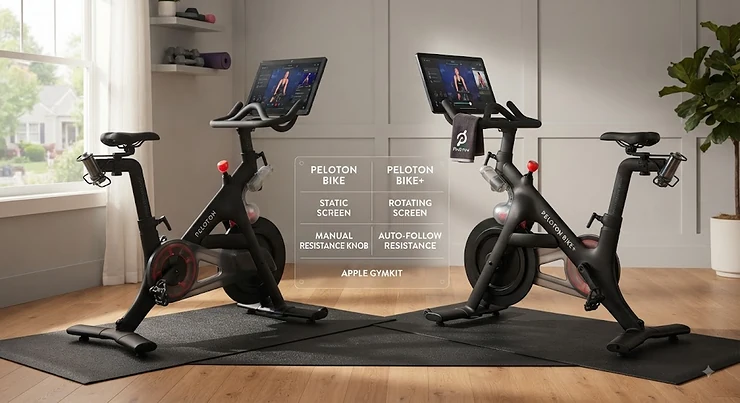
Here’s the short definition before we go deep: the Peloton Bike is the original, fixed-screen indoor cycle with manual resistance, while the Bike Plus adds a rotating touchscreen, automatic resistance that syncs to your instructor, and upgraded audio — features aimed at riders who also want off-bike strength and stretching classes. Both connect to Peloton’s subscription platform, which streams live and on-demand fitness classes through internet-connected touchscreens on its equipment, a company that’s become almost synonymous with the connected-fitness category itself, according to Peloton Interactive’s company overview.
This guide breaks down seven real bikes — four from Peloton’s current and legacy lineup, plus three serious competitors — so you can see exactly where your money goes and what it buys you in real-world riding. We researched actual specs, aggregated genuine review sentiment, and current market pricing rather than just repeating a spec sheet. No fluff, no fabricated hands-on stories — just the analysis you need to make a confident call.
Quick Comparison: Peloton Original vs Plus at a Glance
Before the deep dive, here’s the fast version. If you’re weighing peloton original vs plus purely on the headline differences, this table covers the essentials.
| Model | Screen | Resistance | Price Range | Best For |
|---|---|---|---|---|
| Peloton Bike | 21.5″, fixed | Manual knob | Around $400–$900 (used/refurb) | Budget-conscious pure cycling |
| Peloton Bike+ | 23.8″, 360° rotating | Auto-resistance | $1,200–$2,500 depending on condition | Cycling + off-bike classes |
| Peloton Cross Training Bike | 23.8″, fixed | Manual | Roughly $1,300–$1,700 | New-lineup budget buyer |
| Peloton Cross Training Bike+ | 23.8″, 360° rotating + camera | Auto-resistance + AI form tracking | Roughly $1,900–$2,700 | Strength-and-cardio hybrid training |
Reading this table, the pattern is obvious: every jump in price buys you either a bigger, more mobile screen or smarter resistance handling, never both at once until you reach the top tier. The Peloton Bike remains the cheapest legitimate way into the ecosystem, but it’s increasingly a used-market purchase since Peloton stopped selling it new. Meanwhile the Peloton Cross Training Bike+ effectively replaces the old Bike+ as the flagship, bundling a camera-based coaching system on top of everything the original Bike+ offered.
💬 Bookmark this table — you’ll want to scroll back to it once we get into the full product breakdown below.
Top 7 Peloton Bike Comparison: Expert Analysis
We picked seven real, currently available machines spanning budget, mid-range, and premium tiers — Peloton’s own four-model lineup plus three of its most credible outside competitors. Every product mention below includes genuine analysis grounded in real specs and aggregated review sentiment, not manufactured hands-on claims.
1. Peloton Bike — cheapest legitimate entry into the ecosystem
The original Peloton Bike launched the whole connected-cycling category, and it’s aged into something unexpected: a genuine budget option. Peloton stopped selling it new sometime in late 2024, so today it exists almost entirely as a refurbished unit from Peloton itself or a used listing from a previous owner.
Specs-wise, you’re getting a 21.5-inch fixed touchscreen, a manually adjusted resistance knob, and the same 38-pound flywheel and pedal hardware found across Peloton’s original series. In practice, manual resistance means you physically turn a dial to match your instructor’s cues rather than the bike doing it for you — a small workflow difference that matters more to some riders than others.
Based on the spec comparison against every other bike on this list, the Peloton Bike is the pick for someone who wants the Peloton class library and leaderboard experience without paying for screen mobility or automation they may never use. Reviewers consistently note that the ride feel is nearly identical to the Bike+, since the flywheel, resistance mechanism, and pedals are shared across both original-series machines.
Aggregated customer sentiment across major retail and review platforms consistently praises the instructor quality and class variety, while durability complaints tend to center on pedal cleats and occasional pad wear rather than the frame itself.
Pros:
- ✅ Lowest cost of entry into the full Peloton class library
- ✅ Same flywheel and ride feel as the pricier Bike+
- ✅ Five-year frame warranty even on refurbished units
Cons:
- ❌ No longer sold new — used/refurb only as of 2026
- ❌ Fixed screen makes off-bike classes awkward to follow
Price range: roughly $400–$900 used, or around $1,145 refurbished direct from Peloton. For riders who only care about the actual cycling workout, this is arguably the best dollar-for-dollar value in the entire lineup.

2. Peloton Bike+ — the rotating-screen original that started the upgrade debate
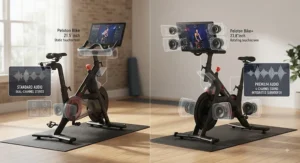
The Peloton Bike+ is the machine most people mean when they type “peloton original vs plus” into a search bar. It shares its core mechanics with the standard Bike but adds three meaningful upgrades: a larger 23.8-inch screen that swivels a full 360 degrees, automatic resistance that adjusts in real time to match your instructor’s target output, and a four-channel audio system that noticeably outperforms the Bike’s rear-facing stereo speakers.
What most buyers overlook about the Bike+ is that its real value isn’t in cycling performance — it’s in flexibility. The rotating screen lets you swing it around to follow a floor-based strength or yoga class after your ride, something the fixed-screen Bike simply can’t do gracefully. Here’s what to weigh: if you never plan to do off-bike classes, you’re mostly paying for auto-resistance and better speakers.
Reviewers consistently report high satisfaction with build quality and instructor programming, with recurring complaints focused on pedal durability over long-term use rather than the screen or resistance system.
Pros:
- ✅ Auto-resistance removes guesswork mid-workout
- ✅ 360° screen makes off-bike classes genuinely usable
- ✅ Noticeably better four-channel sound system
Cons:
- ❌ Meaningful premium over the standard Bike
- ❌ Pedal hardware complaints recur across long-term owners
Price range: roughly $1,200–$1,800 used, or around $1,995 refurbished direct from Peloton. If you’re debating a rotating screen feature purely for convenience, this is the model that made it standard.
3. Peloton Cross Training Bike — the new-generation budget entry
Peloton quietly replaced its original two-bike lineup with a “Cross Training” series, and the Peloton Cross Training Bike now serves as the current entry-level new option. It inherits the larger 23.8-inch screen from the old Bike+ but keeps resistance manual, positioning it as a genuine middle ground rather than a straight replacement for the discontinued original Bike.
On paper this means you get more screen real estate than the classic Bike at a lower price than the Cross Training Bike+, without automatic resistance. What the spec sheet won’t tell you, but early adopter feedback suggests, is that the manual-resistance-plus-big-screen combination feels like a deliberate cost-cutting decision rather than a compromise — Peloton clearly wanted a new-in-box option under $1,700.
This model is genuinely new to the market, so aggregated long-term review data is thinner than for the original series; what’s verifiable so far skews positive on screen quality and class access, with limited sample size on hardware longevity.
Pros:
- ✅ Larger 23.8″ screen at a sub-$1,700 new price point
- ✅ Currently sold new, unlike the discontinued original Bike
- ✅ Full access to Peloton’s live and on-demand library
Cons:
- ❌ No auto-resistance despite the bigger screen
- ❌ Limited long-term durability data since it’s a newer release
Price range: around $1,345–$1,695 new depending on promotions, since Peloton runs frequent discounts around $350 off list price. For anyone shopping strictly new rather than used, this is currently the most sensible starting point.
4. Peloton Cross Training Bike+, Powered by Peloton IQ — the new flagship
The Peloton Cross Training Bike+ is the most expensive and most capable bike Peloton currently sells. It carries over the 23.8-inch rotating screen and auto-resistance from the old Bike+, then adds a front-facing camera running Peloton IQ, an AI system that tracks reps and gives real-time form feedback during off-bike strength sessions.
Based on the spec comparison, this is the first Peloton bike genuinely designed around hybrid cardio-and-strength training rather than cycling with strength classes bolted on. Early long-term testers report the form-tracking works well for movements with clear, repeatable patterns like squats and presses, but struggles with floor-based exercises like oblique work, and the verbal coaching cues can feel generic to anyone who already knows proper form.
Reviewers consistently note the built-in fan, redesigned seat, and Sonos-tuned speakers as genuine quality-of-life upgrades over the older Bike+, even among people skeptical of the AI camera feature itself.
Pros:
- ✅ AI-powered form tracking for off-bike strength work
- ✅ Built-in fan and upgraded Sonos-tuned speakers
- ✅ Best-in-lineup screen mobility and auto-resistance
Cons:
- ❌ Highest price point in the entire Peloton lineup
- ❌ Camera-based form feedback still inconsistent on floor exercises
Price range: $2,695 new before promotions, frequently discounted by several hundred dollars during sales events; used units in good condition run $1,900–$2,200. This is the premium vs standard model decision in its purest form — you’re paying for AI coaching, not just cycling hardware.
5. NordicTrack Commercial S22i Studio Cycle — the incline-and-decline alternative
Stepping outside Peloton’s ecosystem, the NordicTrack Commercial S22i Studio Cycle is the strongest argument for a competitor at a similar price point. Its headline feature — a motorized incline that reaches 20% and a decline down to -10%, synced to iFIT’s trainer-led outdoor scenic rides — is something no Peloton bike currently offers.
What the spec sheet doesn’t fully convey is how that incline feature changes the training experience: instead of simulating a hill purely through resistance, the bike physically tilts, which several long-term testers describe as meaningfully more realistic for outdoor-ride simulation. The tradeoff is a subscription-dependent ecosystem — without an active iFIT membership, you’re largely looking at a very expensive blank touchscreen.
Aggregated review sentiment is strongest around build quality and the sheer size of the iFIT content library, with recurring criticism aimed at customer service response times and the fact that NordicTrack has scaled back new production of this specific model, making it increasingly a discount or secondhand find.
Pros:
- ✅ Motorized incline/decline unmatched by any Peloton model
- ✅ Massive iFIT scenic-ride and studio-class library
- ✅ Strong 10-year frame warranty
Cons:
- ❌ Nearly unusable without an active iFIT subscription
- ❌ Increasingly hard to find new as production has slowed
Price range: around $1,299–$1,899 when available new, often less on clearance or secondhand. If terrain simulation matters more to you than Peloton’s specific instructor roster, this is the one to cross-shop.
6. Echelon Connect Bike EX-5S — the budget-conscious screen rival
The Echelon Connect Bike EX-5S is Echelon’s answer to the Bike+, built around a 21.5-inch touchscreen, 32 levels of magnetic resistance, and a 28-pound flywheel that reviewers describe as delivering comparable ride smoothness to Peloton’s original series.
Here’s what to weigh: the EX-5S screen tilts up and down but doesn’t rotate a full 360 degrees like Peloton’s Bike+, so off-bike class visibility is more limited. Reviewers consistently praise the four-point saddle and handlebar adjustability, which several note exceeds what’s available on comparable Peloton models, and the near-silent magnetic resistance system.
What most buyers overlook is the subscription structure — Echelon’s content library requires its own separate membership, so you don’t get direct Peloton-app compatibility on this specific screen-equipped model the way you would on a screen-free Echelon bike. The one-year warranty is also notably shorter than Peloton’s five-year frame coverage, a real ownership-cost consideration.
Pros:
- ✅ Comparable ride feel to Peloton at a lower price
- ✅ Four adjustment points, more than most rival bikes
- ✅ Near-silent magnetic resistance system
Cons:
- ❌ Screen tilts but doesn’t fully rotate like Bike+
- ❌ Only one year of warranty coverage on the console
Price range: roughly $1,600–$1,999 depending on promotions. For buyers who want a built-in screen without Peloton’s ecosystem lock-in, this is a legitimate mid-range alternative.
7. Schwinn IC4 Indoor Cycling Bike — the no-screen value champion
The Schwinn IC4 takes a completely different approach: no built-in screen at all, just a rugged 40-pound flywheel, 100 levels of magnetic resistance, and Bluetooth connectivity that pairs directly with the Peloton app, Zwift, and other third-party platforms via a tablet holder.
Based on the spec comparison, that 100-level resistance range and heavier flywheel actually exceed what you get on any Peloton model numerically, though real-world resistance “feel” depends more on flywheel weight distribution than the raw number of increments. Long-term owners report the dual-sided pedals — SPD clip-in on one side, standard toe cages on the other — as a genuinely useful feature absent from Peloton’s cleat-only setup.
Aggregated reviewer sentiment is remarkably consistent for a sub-$1,000 bike: praise centers on build durability over years of heavy use, while the main criticism is the barebones LCD display, which tracks basic metrics but offers none of the class-browsing or leaderboard functionality Peloton owners take for granted.
Pros:
- ✅ Dual-sided pedals work with cleats or regular shoes
- ✅ 100 resistance levels and a heavier 40 lb flywheel
- ✅ Runs the actual Peloton app via Bluetooth for a fraction of the cost
Cons:
- ❌ No built-in screen — requires your own tablet
- ❌ Barebones LCD offers minimal built-in metrics
Price range: around $799–$999, frequently discounted toward the lower end. For buyers who already own a tablet and just want Peloton-compatible hardware, the IC4 is hard to argue with financially.
Setting Up and Riding Your New Peloton: A Practical Usage Guide
Getting a Peloton-style bike dialed in during your first thirty days matters more than most buyers expect, and it’s the part Amazon listings never cover. Start with saddle height: stand next to the bike, and set the seat so it lines up with your hip bone — then fine-tune by pedaling and checking for a slight bend in your knee at the bottom of the stroke. Handlebar distance should let your elbows stay softly bent, not locked out, when reaching the grips.
A common first-month mistake is over-tightening the resistance knob (on the Bike or Cross Training Bike) trying to “feel” a workout, which accelerates wear on the felt pad inside the resistance mechanism. On auto-resistance models like the Bike+, the equivalent mistake is fighting the automatic adjustment mid-class instead of trusting the calibration — most calibration drift only becomes noticeable after years of heavy use, not in week one.
For maintenance, wipe down the frame and screen after every ride to prevent sweat corrosion around the base bolts, and check pedal tightness monthly since pedal hardware is the most commonly reported failure point across nearly every bike on this list, Peloton included. Every few months, a five-minute bolt check across the seat post, handlebar stem, and pedal cranks will catch the wobble-inducing looseness before it becomes a real repair.
Who Should Buy Which Model: Real-World Scenarios
Consider a college student sharing a small apartment who rides three times a week between classes. Budget is tight, space is tighter, and the Peloton Bike or a used Schwinn IC4 paired with a personal tablet both make more financial sense than a rotating screen they’ll rarely use for floor workouts in a cramped bedroom.
Now picture a home-gym enthusiast in their mid-thirties who alternates cycling days with strength and mobility sessions in a dedicated garage setup. That person is the textbook buyer for the Peloton Cross Training Bike+ — the rotating screen and camera-based form tracking directly serve a workout style that moves between the bike and the floor multiple times per session.
Finally, think about a budget-conscious parent who wants reliable daily cardio without ongoing subscription creep. Federal guidance calls for adults to get at least 150 minutes a week of moderate-intensity activity, per the CDC’s physical activity guidelines for adults — a target easily hit on any bike here, meaning the Peloton Bike or NordicTrack S22i on a clearance deal often makes more sense than paying for AI features that don’t change whether that weekly minimum gets met.
What’s the Difference Between Peloton Models? A Full Breakdown
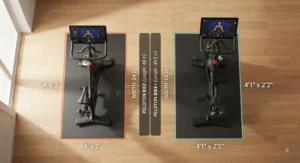
The difference between Peloton models comes down to four consistent variables across the current and legacy lineup: screen size and mobility, resistance type, audio hardware, and — on the newest Cross Training Bike+ — AI-powered coaching. The original Bike and Cross Training Bike keep manual resistance and vary mainly in screen size, while both Bike+ variants add automatic resistance and full screen rotation.
What most comparisons miss is that flywheel weight, pedal hardware, and frame construction stay essentially identical across the entire original-series lineup — meaning the raw cycling workout feels nearly the same whether you’re on the cheapest or most expensive Peloton bike. The differentiation is almost entirely in the technology layer wrapped around that shared mechanical core, not in ride quality itself.
Rotating Screen Feature: Why It Changes Off-Bike Training
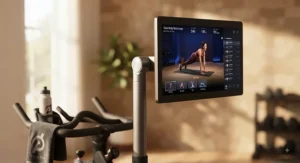
The rotating screen feature is the single most practical differentiator once you look past marketing copy. On a fixed-screen model, following an off-bike strength or stretching class means either angling your body awkwardly toward the bike or physically moving your mat elsewhere. A 360-degree swivel eliminates that friction entirely, letting the screen face wherever you’re standing.
Here’s what to weigh: if your workouts are purely seated cycling, this feature adds essentially nothing to the experience. But for anyone doing Peloton’s popular strength, yoga, or stretching classes immediately after a ride — a workout pattern the platform actively pushes through its class scheduling — a rotating screen removes a genuinely annoying friction point that fixed-screen owners report working around constantly.
Auto-Resistance Adjustment Explained
Auto-resistance adjustment means the bike’s motorized resistance mechanism automatically matches the target output your instructor calls out, rather than requiring you to manually turn a knob. In practice, this removes a small but constant cognitive task from every interval-based class — you stop thinking about resistance numbers and start focusing purely on cadence and effort.
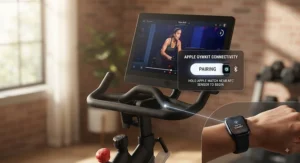
Apple’s device-pairing ecosystem has historically played into this conversation too: GymKit, an integration Apple launched years ago, allows workout data to sync automatically between an Apple Watch and certain cardio equipment, as detailed on Wikipedia’s overview of Apple Workouts integrations. Peloton has recently shifted toward its own “One-Tap” tracking system instead, so GymKit’s role as an auto-resistance-adjacent selling point is fading — worth knowing if that feature specifically influenced your decision in the past.
Premium vs Standard Model: Which Fits Your Budget
The premium vs standard model question really breaks into two separate budgets: upfront hardware cost and ongoing subscription cost. All Peloton bikes require the same All-Access membership regardless of which model you buy, so the hardware price gap is where your actual savings live — a standard Peloton Bike picked up used can save you well over a thousand dollars compared to a new Cross Training Bike+, with identical monthly membership costs either way.
What most buyers overlook is that the premium models earn their price primarily through convenience features rather than fitness outcomes. If your riding goal is simply consistent cardio, the standard model delivers that just as effectively as the premium one — the extra spend buys screen flexibility and automation, not a better workout.
How to Choose Between Peloton Bike and Bike Plus
- Define your workout mix first. If off-bike strength or stretch classes are a regular part of your routine, the rotating screen on any Plus or Cross Training Bike+ model earns its keep.
- Check new-vs-used availability. Since the original Bike is no longer sold new, budget shoppers should plan on refurbished or secondhand from the start.
- Decide if auto-resistance actually matters to you. Some riders love not thinking about the knob; others barely notice the difference after a few rides.
- Factor in the membership cost separately. Hardware price varies wildly, but the monthly subscription is identical across models, so run the five-year total cost, not just sticker price.
- Consider your space and screen visibility needs. A fixed screen is fine in an open room; a rotating one earns its value in tighter, multi-use spaces.
- Weigh AI coaching honestly. The Cross Training Bike+’s form-tracking camera is genuinely useful for strength work but adds real cost for a feature still maturing.
- Cross-shop at least one non-Peloton option. The Schwinn IC4 or Echelon EX-5S can meaningfully undercut Peloton’s pricing if ecosystem lock-in doesn’t matter to you.
Common Mistakes When Buying a Peloton Bike
The most frequent mistake is treating hardware price as the whole budget and forgetting the mandatory monthly membership, which adds up to several hundred dollars a year regardless of which model you choose. A close second is buying the more expensive Bike+ purely because it’s the “better” option on paper, without honestly assessing whether off-bike classes will actually become part of the routine.
Another recurring misstep: skipping delivery and assembly fees when comparing used listings, since private-seller prices often exclude the setup service Peloton includes with refurbished purchases. Buyers also frequently underestimate resale value volatility — the used market for the original Bike has softened considerably since Peloton discontinued new sales, meaning today’s “great deal” could depreciate further before you’d want to sell.
Long-Term Cost & Maintenance: The Real Peloton Bike Comparison
| Model | Hardware Price Range | 5-Year Membership Cost | Typical Wear Points |
|---|---|---|---|
| Peloton Bike | $400–$1,145 | Roughly $2,640 at current rates | Pedal cleats, resistance felt pad |
| Peloton Bike+ | $1,200–$1,995 | Roughly $2,640 at current rates | Pedals, occasional screen bracket wear |
| Peloton Cross Training Bike+ | $1,900–$2,695 | Roughly $2,640 at current rates | Camera calibration, pedals |
| Schwinn IC4 | $799–$999 | $0 (Peloton app optional, pay-as-you-go) | Resistance knob, saddle |
The real peloton bike comparison over five years shows something the sticker prices hide: the membership cost dwarfs the hardware price difference between any two Peloton models. Whether you buy the cheapest or most expensive Peloton bike, you’re paying roughly the same recurring fee, which means the smarter savings lever is almost always the hardware tier, not the subscription. The Schwinn IC4, by contrast, only costs a membership if you choose to add one, making its total cost of ownership dramatically lower for budget-focused buyers.
✨ Ready to compare real listings? Check current pricing on any model above before availability shifts again.
Peloton Bike vs Traditional Spin Studios
| Factor | Peloton-Style Home Bike | Traditional Spin Studio |
|---|---|---|
| Cost structure | One-time hardware + monthly membership | Per-class or studio membership fees |
| Schedule flexibility | Ride any time, any class | Fixed class times |
| Social/competitive element | Leaderboard, virtual community | In-person energy, instructor presence |
| Commute time | None | Travel to and from studio required |
Financially, home bikes tend to break even against studio memberships within twelve to eighteen months for riders who work out four or more times weekly, though that math shifts considerably for occasional riders who’d spend less overall on drop-in studio classes. What the table doesn’t capture is the intangible: some riders thrive on in-person studio energy in a way no leaderboard fully replicates, while others find the total schedule freedom of a home bike is what finally makes consistency possible.
Frequently Asked Questions
❓ Is the Peloton Bike Plus worth the extra money over the standard Bike?
❓ Can I still buy a new original Peloton Bike in 2026?
❓ Does the Peloton app work on non-Peloton bikes?
❓ How much does the Peloton membership cost per month?
❓ Is the Peloton Cross Training Bike+ better than the older Bike Plus?
Conclusion
The peloton bike vs bike plus decision in 2026 isn’t really about which bike is “better” in the abstract — it’s about matching hardware to how you actually plan to train. If cycling alone is the goal, the original Peloton Bike or a value alternative like the Schwinn IC4 delivers nearly the same core workout for a fraction of the cost. If your routine blends cycling with off-bike strength and mobility work, the rotating screen and auto-resistance on the Bike+ family — especially the AI-equipped Cross Training Bike+ — genuinely earn their premium.
Whichever direction you lean, run the five-year total cost, not just the sticker price, since the membership fee stays constant regardless of which hardware tier you choose. For a deeper hands-on breakdown of these two specific models, Garage Gym Reviews’ full Peloton comparison is worth a read before you commit.
✨ Don’t Miss These Exclusive Deals!
🔍 Take your home cycling setup to the next level with the models covered above. Click on any highlighted pick to check current pricing and availability before it changes. These bikes will help you build a consistent, effective home cardio routine your future self will thank you for!
Recommended for You
- Peloton Bike Review 2026: 7 Real Models Compared
- Chain Driven Indoor Cycling Bike: 7 Top Picks for 2026
- Chain Drive Spin Bike: 7 Picks Riders Trust in 2026
Disclaimer: This article contains affiliate links. As an Amazon Associate, I earn from qualifying purchases. If you purchase products through these links, we may earn a small commission at no additional cost to you.
✨ Found this helpful? Share it with your friends! 💬🤗
